


Helping You Choose a Computer Keyboard (Mechanical or Membrane?)
If you are in the market for a computer keyboard, especially for your gaming or typing needs, you may come across two types of keyboards: a mechanical computer keyboard and a membrane computer keyboard.
If you don’t know what sets them apart, you may find it difficult choosing between the two. This article helps you know the difference between mechanical and membrane computer keyboards and how to make an informed choice.
Similarities and Differences of Mechanical and Membrane Computer Keyboards
Similarities
Both mechanical and membrane keyboards appear similar externally. That’s why it can be difficult telling them apart by just looking at them. They have the same external visual features like the keyboard’s back-light, color and key arrangement.
You can only tell the difference when you try them out (actually type on them) or know what to check for.
They can both accomplish the same task (typing or gaming), but you might feel better using a mechanical computer keyboard.
Differences
Think of it this way, mechanical computer keyboards are like Mercedeses or Aston-Martins of the computer keyboard world. They are luxurious and head turners if only you can afford them. You even get a special feel when typing or gaming on them.
Membrane computer keyboards handle work the same way as mechanical computer keyboards but are more like Peugeots and Skodas. They feel boring, bleak and average.
Mechanical Computer Keyboards
Membrane Computer Keyboards
There are two kinds:
- The first has individual mechanical switches under each key. They also have a spring underneath to help bring the key back up after pressing.
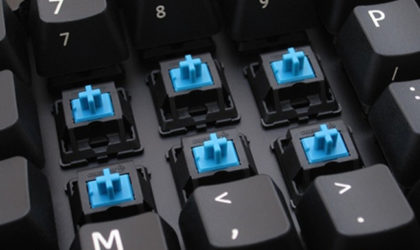
Image credit: howtogeek
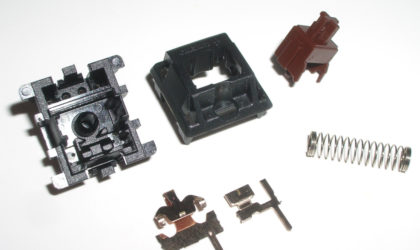
Image Credit: mechanical-keyboard
- The second has a scissor switch like design.
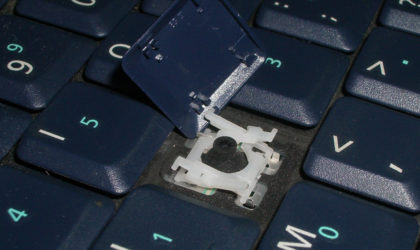
Image Credit: mechanical-keyboard
Membrane computer keyboards have a thin membrane placed under the keys (a kind of rubber-like pressure pad in the shape of your keyboard, which is placed under the keyboard keys). Under the rubber pad there is a conductive trace sheet that sends the signals to be registered by your computer.
Membrane computer keyboards are not as complicated as mechanical computer keyboards and that is why they are cheaper.
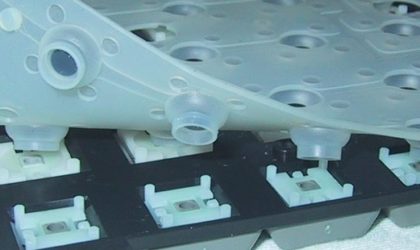
Image credit: mechanicalkeyboardguide
The mechanical switches can either be blue, red, brown, black,silver, white, clear or yellow and each color has a meaning.
The most common colors are blue, black, brown and red; you might hear them being referred to as the blues, reds, browns or blacks.
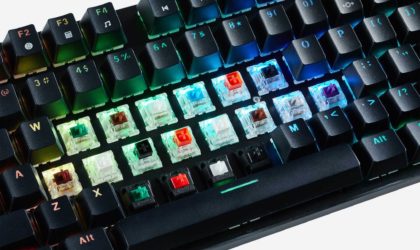
Image credit: appuals
Color Meaning
Before getting into what each switch color means, you should understand three key terms:
- Tactile Feedback
- Audible click switch feedback
- Linear switches
To understand the above terms, you need to ask yourself one question: What makes you know that a key on your keyboard has been registered by your computer if you press it? The answer is always that the computer has reacted the way it needed to after pressing a particular key. For example, if you have an editor open, you will, of course, see the letter or number you pressed typed out.
Let’s get back to our terms:
Other than the visual confirmation mentioned above, there is a way a key feels when you press. This is where the terms above come in:
- Tactile feedback is that bumpy feeling you get when you press down a key that lets you know you have pressed the key and it should be registered.
- An audible click is a sound you get when you press a key on your keyboard. It also tells you that you have pressed the key and it should be registered.
- Linear means that there is no sound and no tactile feedback.
Switch Color and What It Means
Blues: Have tactile feedback and audible click
Browns: Have tactile feedback but no audible click
Blacks: Are linear and require some force when pressing them.
Reds: Are linear. They require less down-force.
Advantages
- Ability to choose by preference (click, tactile or linear), therefore, improved feedback for your typing or gaming needs.
- Mechanical computer keyboards are durable (they have a long lifespan and do not wear out quickly). However, this depends on whether you abuse your keyboard (smashing on your keyboard keys, pouring liquids on it, dropping crumbs of food inside your keyboard, dropping your keyboard frequently, etc.)
- Mechanical computer keyboards
- Ease of cleaning because you only need to lift each key individually and clean.
Disadvantages
- Mechanical computer keyboards are expensive
- They can be noisy (clicking sound). Some people might mind loud clicks; you can choose less noisy mechanical keyboard switches or use O-rings that help reduce noise.
If dirt gets into your switches and you don’t clean it, you can experience key chattering (pressing a key, for example, “e” and when you let go it continues typing “eeeeeeeee”).
Advantages
- Membrane computer keyboards are quieter.
- They are also cheaper than mechanical computer keyboards. However, you might find some that are expensive because of the special specifications they might have, for example, programmability and anti-ghosting features.
Disadvantage
- They can be durable, but durability depends on whether you abuse your keyboard (smashing on your keyboard keys, pouring liquids on it, dropping crumbs of food inside your keyboard, dropping your keyboard frequently, etc.). This happens over time, but not always.
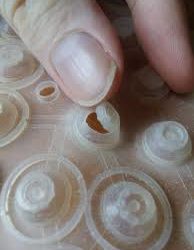
Image credit: superuser
- They require more work when cleaning because you have to open up the entire keyboard.
How Do You Know Which computer keyboard (membrane or mechanical) to Buy?
Most people recommend mechanical computer keyboards, but you have to figure out the switch you are comfortable with. The best way to tell which one you might like is by carrying out a test. Are you buying your mechanical computer keyboard online or from a store?
Buying online:
There is a test kit you can purchase to help you know which switch you will be comfortable with on a mechanical computer keyboard.
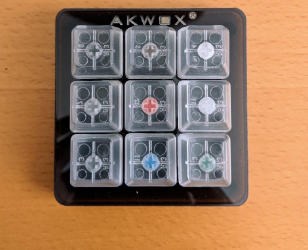
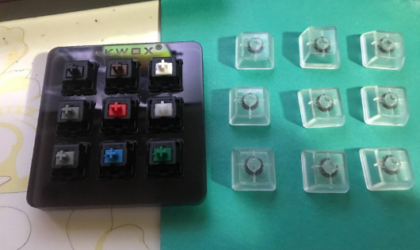
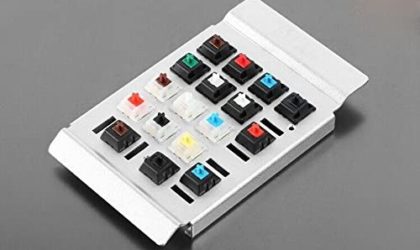
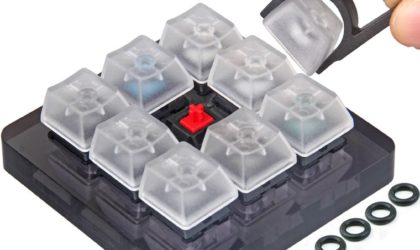
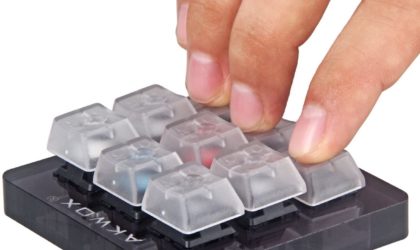
You can get the above devices through the links below: (they are affiliate links from amazon that will give me a commission with no extra cost to you).

AKWOX 9-Key Cherry MX Switch Tester, Keycap Puller, Keyboard Keycap, O-Ring Sampler Tester Kit

Buying from a store:
This is easy because you only have to ask the salesperson to present you with mechanical keyboards of different switch colours (blue, brown, black, red, etc.) test them and see which one feels comfortable. Ask for a membrane keyboard as well and give it a try. You can then make an informed and satisfactory decision.